
These instructions relate to the NR RSL Seniors Baseball Club.
If you are looking for the NR RSL Junior Baseball Club, please access their site intead: NR RSL Junior Baseball Club
We use a new electronic platform to manage membership and registration: GameDay Passport.
How to register for the Summer 2026/2027 season...
- Using your browser, navigate to our new Registration Portal: CLICK HERE
- You will be prompted to select the number of people that you'll be registering. Typically this will simply be yourself (1 adult), but you're able to register multiple players at once...

- You'll then be prompted to provide your email address. If you're a returning player, use the address that you have used to register with the club previously...

- If your email address has been previously registered, you will then be prompted to provide the associated password. If you forget your password, simply click the 'Forgot Password' link and follow the instructions. New players will be required to check their mailbox for a verification message, and then proceed with the registration process...

- Once you have been authenticated, you can proceed with the registration process. The system will prompt you to select your own registration, or allow you to add another (new) player to your account...

- The system will then prompt you to select the club for whom you wish to register...

- You'll also be prompted to select the type of registration you'll be submitting...

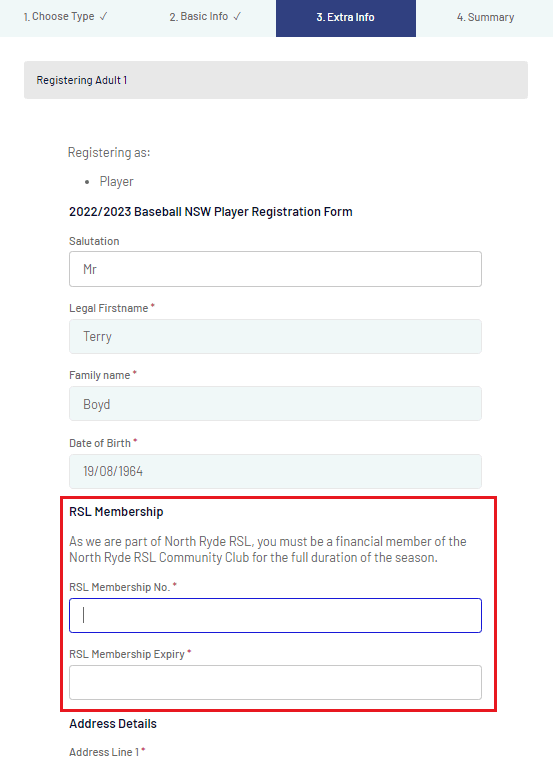
- The system will then collect & verify all of your personal details. It is very important that you provide your RSL Membership details at this stage (you'll not be able to complete your registration without them)...
- Finally, you'll be prompted to select a payment method and pay for your registration. A receipt will be automatically sent through to your email address...


